
Hoppa till innehåll
  • Drift
  • Webmail
  • Logga in
Svenskadomäner
  • WEBBHOTELL
    • WEBBHOTELL
    • DNS KONTO
  • DOMÄNER
    • DOMÄNREGISTERING
    • DOMÄNFLYTT
    • TOPPDOMÄNER
  • HEMSIDA
    • Börja här – Metoder för att bygga hemsida
    • HEMSIDA – BYGGD AV EXPERTER
    • WEBBSHOP – BYGGD AV EXPERTER
    • Underhåll WordPress-hemsida
    • WEEBLY HEMSIDABYGGARE
    • SITEPRO HEMSIDABYGGARE
    • 1-KLICKINSTALLATION
  • E-POST
  • MICROSOFT 365
  • SSL
  • SUPPORT
    • KUNDSKAPSCENTER
    • BLOGG
  • KONTAKTA
    • Kontakta
    • Om Oss

Användarvillkor

3
  • Svenska Domäner – Avtalsvillkor
  • Svenska Domäners – Integritetspolicy
  • MISSBRUK

Databas

1
  • Vilken ’host’ ska jag använda vid anslutning till min databas?

DNS

54
  • How do I cancel a service/domain?
  • Hur säger jag upp en domän / tjänst?
  • How to navigate to service’s main page?
  • Hur navigerar jag till tilläggstjänstens huvudsida?
  • How can I view/edit nameservers for domain?
  • Hur kan jag visa/ändra namnservrar för min domän?
  • How can I disable automatic renewal of my subscription?
  • Hur inaktiverar jag automatisk förnyelse av mitt abonnemang?
  • How to manage the DNS zone for my domain?
  • Hur hanterar jag DNS zonen för min domän?
  • What happens with my domain/service when I cancel my subscription?
  • Vad händer med min domän/tjänst när jag säger upp mitt abonnemang?
  • Hur åtgärdar jag DNS problem?
  • How to resolve issue with DNS?
  • Kan jag hantera DNS för min domän?
  • Can I manage DNS for my domain?
  • Vad är ett abonnemang av en domän/tilläggstjänst?
  • What is domain/service subscription?
  • Vad händer om jag inte betalar för mitt abonnemang?
  • What happens if I don’t pay my subscription?
  • Vad är ett Domänkonto?
  • What is Domain Account?
  • Vad är en multidomäntjänst?
  • What is multidomain service?
  • Vad händer efter min beställning?
  • What happens after my order?
  • Hur uppgraderar jag min tilläggstjänst?
  • How to upgrade my service?
  • Hur importerar jag DNS-data/vidarebefordringar?
  • How to import DNS/forwarders data?
  • Vad händer när systemet inaktiverar mitt abonnemang?
  • What happens when system inactivates my subscription?
  • Hur exporterar jag DNS-data/vidarebefordringar?
  • How to export DNS/forwarders data?
  • Hur ångrar jag en uppsägning?
  • How can I revoke my cancellation request?
  • Hur återaktiverar jag mitt inaktiverade abonnemang?
  • How can I reactivate my inactivated subscription?
  • Hur återställer jag mitt uppsagda abonnemang?
  • How can I redeem my cancelled subscription?
  • Varför får jag varningsmeddelanden gällande inaktivering av mitt abonnemang?
  • Why am I receiving notifications about inactivation of my subscription?*
  • Vad är DNS?
  • What is DNS?
  • Vad är DNSSEC?
  • What is DNSSEC?
  • Hur lägger jag till DNSSEC DS-post för min domän?
  • How to add DNSSEC DS record?
  • Hur inaktiverar jag DNSSEC för min domän?
  • How to deactivate DNSSEC for your domain?
  • Hur aktiverar jag DNSSEC för min domän?
  • How to activate DNSSEC for your domain?
  • Hur ändrar man säkrast DNS med DNSSEC aktiverat?
  • How to safely change DNS with DNSSEC activated?
View Categories
  • Home
  • Kunskapscenter
  • SitePro Site builder
  • How big should my background picture be when building with SitePro?

How big should my background picture be when building with SitePro?

2 min read

Background image size #

There is no best size for background image! It all depends on you and your idea how the site should look like.

According to worldwide statistics for the last quarter of 2016, the most used screen resolution is 1366 x 768 px, followed by 1920 x 1080 px.

However, if you want to have full background image we recommend picture with dimensions 1980 x 1280 px (width x height). This will ensure you have full size background image on your site. It’s not a problem if your picture is higher, just make sure it’s width is correct. Here is a visualization of website visible part on the most used desktop screen:
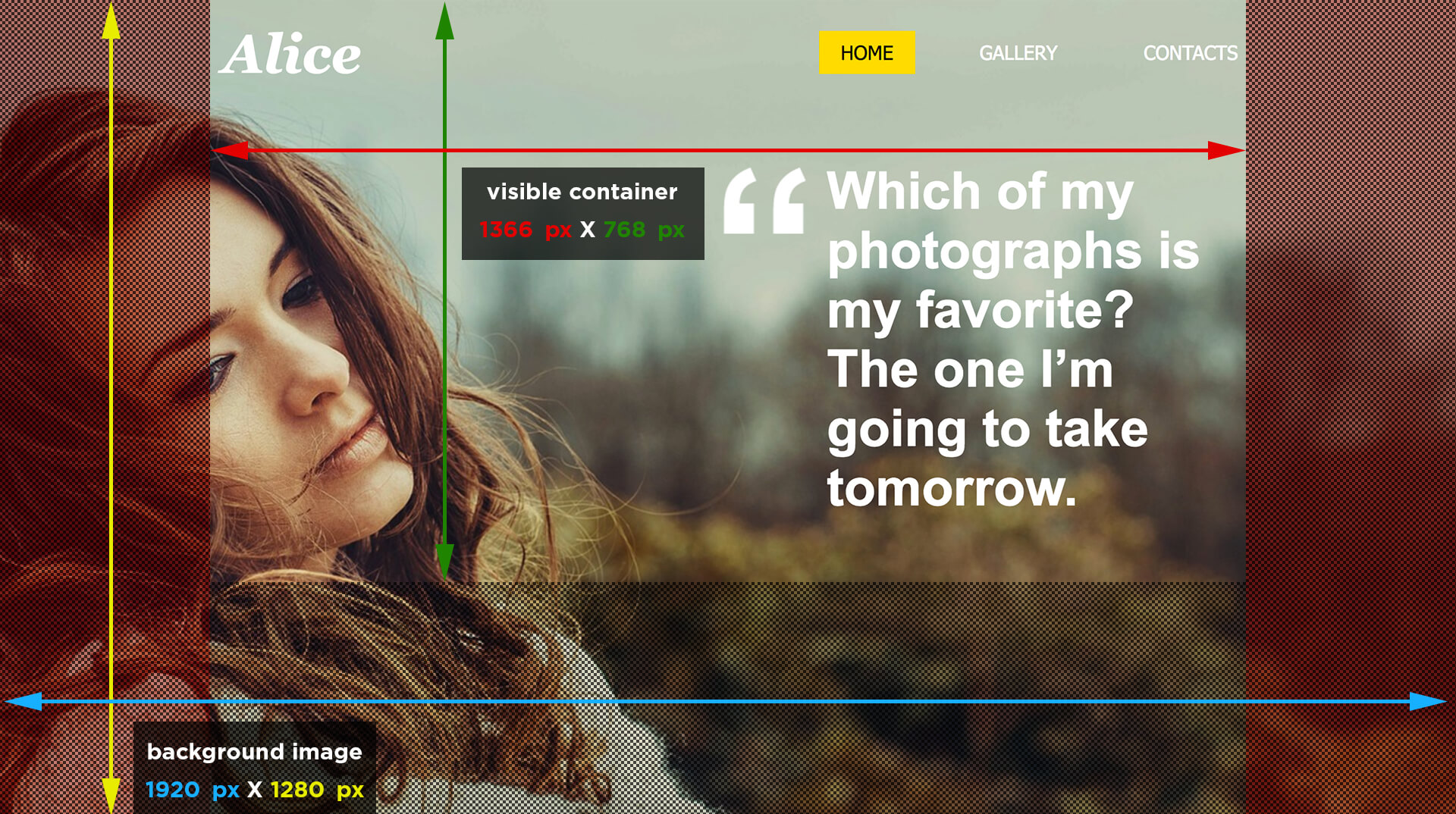
Marked areas on both sides might or might not be visible for most of your visitors, that’s why they shouldn’t be full with content. If you know that most of your visitors are browsing on larger screens we suggest you to activate “WIDE” visualization from responsive options.

How to find image dimensions on iOS (mac)? #

Method 1 #
  1. Open Finder and find the location of your image file.
  2. Right-click on the image and select ”Get info”.
  3. Scroll to section ”More info” where you can see file dimensions.
Method 2 #
  1. Create a new folder with your images.
  2. Change the name of the folder to “Pictures” (case is important!)
  3. Go to menu ”View” and select ”as List” option.
  4. Right click on the list’s titlebar to enable the ”Dimensions” column.
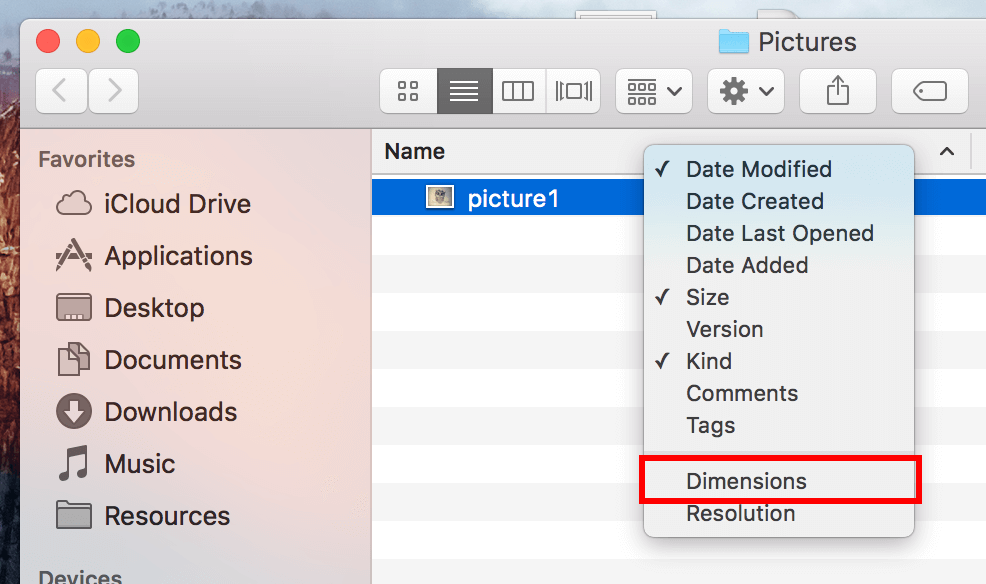
  5. Once activated you can rename back your folder to whatever name you prefer. The Dimension column will remain there.

The list of extra columns is relative to the folder’s name/location. In order to get the dimensions available, the folder in question should be renamed to ”Pictures” or has to reside somewhere under ~/Pictures/.

How to find image dimensions on Windows? #

Method 1 #
  1. Open the folder where you picture is located.
  2. Right-click on image and select ”Properties”.
  3. Scroll to section ”Image” where you can see file dimensions.
Method 2 #
  1. Put your image files in a folder.
  2. Go to menu “View” and select ”Choose details”.
  3. Click to enable the check box of ”Dimensions” and click on OK.
  4. Show the pictures in detailed list.

What are your Feelings

  • Happy
  • Normal
  • Sad
Share This Article :
  • Facebook
  • X
  • LinkedIn
  • Pinterest
Table of Contents
  • Background image size
  • How to find image dimensions on iOS (mac)?
    • Method 1
    • Method 2
  • How to find image dimensions on Windows?
    • Method 1
    • Method 2
Trygga och säkra betalningar
Visa logotyp Stäng-ikon Nets logotyp
Alla priser är SEK ex. moms
Facebook

.se-agent. .nu-agent

Företag

  • Om oss
  • Jobb
  • Kontakta
  • Integritetspolicy
  • Avtalsvillkor
  • Personuppgifts­biträdesavtal

Support

  • Driftinformation
  • Kundcenter
  • Kunskapsbas
  • Skicka supportärende

Tjänster

  • Domänregistrering
  • Domänflytt
  • Toppdomäner
  • Webbhotell
  • E-post
  • SSL-certifikat
  • Microsoft 365
  • Kampanjer
  • 1-klicks-installation


  • 3 sätt – bygga hemsida
  • Hemsida
  • Webbshop
  • Underhåll WordPress-hemsida
  • Weebly hemsidesbyggare
  • SitePro Hemsidebyggare
  • WordPress
© 2026 Svenskadomäner • Byggt med GeneratePress