
Hoppa till innehåll
  • Drift
  • Webmail
  • Logga in
Svenskadomäner
  • WEBBHOTELL
    • WEBBHOTELL
    • DNS KONTO
  • DOMÄNER
    • DOMÄNREGISTERING
    • DOMÄNFLYTT
    • TOPPDOMÄNER
  • HEMSIDA
    • Börja här – Metoder för att bygga hemsida
    • HEMSIDA – BYGGD AV EXPERTER
    • WEBBSHOP – BYGGD AV EXPERTER
    • Underhåll WordPress-hemsida
    • WEEBLY HEMSIDABYGGARE
    • SITEPRO HEMSIDABYGGARE
    • 1-KLICKINSTALLATION
  • E-POST
  • MICROSOFT 365
  • SSL
  • SUPPORT
    • KUNDSKAPSCENTER
    • BLOGG
  • KONTAKTA
    • Kontakta
    • Om Oss

Användarvillkor

3
  • Svenska Domäner – Avtalsvillkor
  • Svenska Domäners – Integritetspolicy
  • MISSBRUK

Databas

1
  • Vilken ’host’ ska jag använda vid anslutning till min databas?

DNS

54
  • How do I cancel a service/domain?
  • Hur säger jag upp en domän / tjänst?
  • How to navigate to service’s main page?
  • Hur navigerar jag till tilläggstjänstens huvudsida?
  • How can I view/edit nameservers for domain?
  • Hur kan jag visa/ändra namnservrar för min domän?
  • How can I disable automatic renewal of my subscription?
  • Hur inaktiverar jag automatisk förnyelse av mitt abonnemang?
  • How to manage the DNS zone for my domain?
  • Hur hanterar jag DNS zonen för min domän?
  • What happens with my domain/service when I cancel my subscription?
  • Vad händer med min domän/tjänst när jag säger upp mitt abonnemang?
  • Hur åtgärdar jag DNS problem?
  • How to resolve issue with DNS?
  • Kan jag hantera DNS för min domän?
  • Can I manage DNS for my domain?
  • Vad är ett abonnemang av en domän/tilläggstjänst?
  • What is domain/service subscription?
  • Vad händer om jag inte betalar för mitt abonnemang?
  • What happens if I don’t pay my subscription?
  • Vad är ett Domänkonto?
  • What is Domain Account?
  • Vad är en multidomäntjänst?
  • What is multidomain service?
  • Vad händer efter min beställning?
  • What happens after my order?
  • Hur uppgraderar jag min tilläggstjänst?
  • How to upgrade my service?
  • Hur importerar jag DNS-data/vidarebefordringar?
  • How to import DNS/forwarders data?
  • Vad händer när systemet inaktiverar mitt abonnemang?
  • What happens when system inactivates my subscription?
  • Hur exporterar jag DNS-data/vidarebefordringar?
  • How to export DNS/forwarders data?
  • Hur ångrar jag en uppsägning?
  • How can I revoke my cancellation request?
  • Hur återaktiverar jag mitt inaktiverade abonnemang?
  • How can I reactivate my inactivated subscription?
  • Hur återställer jag mitt uppsagda abonnemang?
  • How can I redeem my cancelled subscription?
  • Varför får jag varningsmeddelanden gällande inaktivering av mitt abonnemang?
  • Why am I receiving notifications about inactivation of my subscription?*
  • Vad är DNS?
  • What is DNS?
  • Vad är DNSSEC?
  • What is DNSSEC?
  • Hur lägger jag till DNSSEC DS-post för min domän?
  • How to add DNSSEC DS record?
  • Hur inaktiverar jag DNSSEC för min domän?
  • How to deactivate DNSSEC for your domain?
  • Hur aktiverar jag DNSSEC för min domän?
  • How to activate DNSSEC for your domain?
  • Hur ändrar man säkrast DNS med DNSSEC aktiverat?
  • How to safely change DNS with DNSSEC activated?
View Categories
  • Home
  • Kunskapscenter
  • Calendar, Contacts, ActiveSync
  • Thunderbird – sync calendar, contacts and email

Thunderbird – sync calendar, contacts and email

2 min read

Thunderbird mail client doesn’t support EAS (Exchange ActiveSync). That’s why you need to configure your mail using standard procedure:
– Guide for POP3
– Guide for IMAP

1. For contact synchronization, you need to set up a CardDav account using SOGo connector. #

How to do it?

1. Download the SOGo connector from SOGo website: https://sogo.nu/.
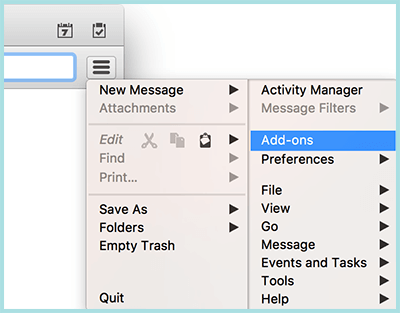
2. Open Thunderbird and go to:
– macOS: Tools -> Add-ons -> Extensions
– Windows: Tools -> Add-ons.
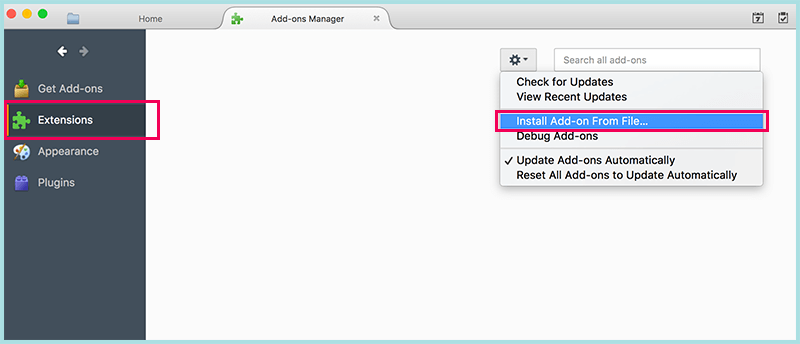
3. Click on the gear icon and choose ”Install Add-on From File…”

4. Select the downloaded SOGo Connector xpi file to install it.

5. Restart Thunderbird.

6. Login to your mail account using SOGo: mail.svenskadomaner.se.
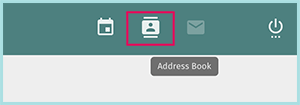
7. Click on ”Address book” in the top right corner.
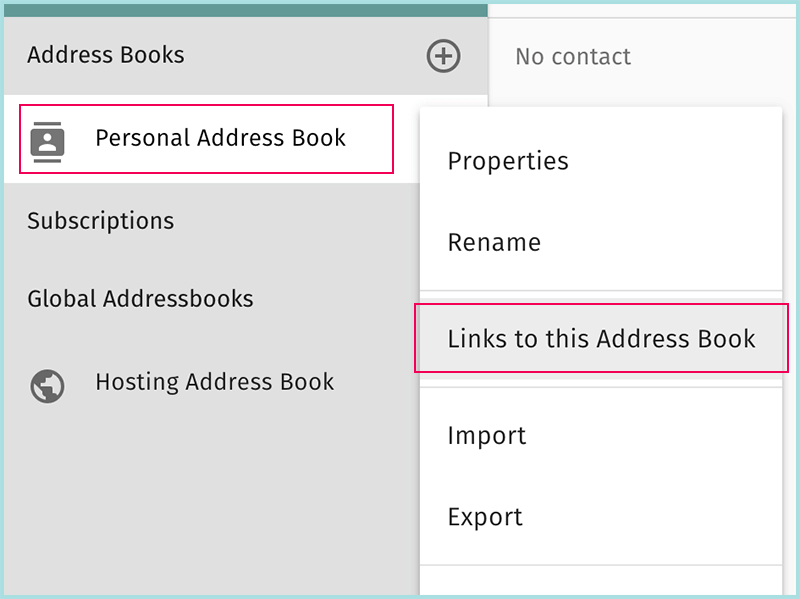
8. Choose the address book you want to sync (Personal Address Book is the default one), click on 3 vertical dots, choose ”Link to this Address Book”.
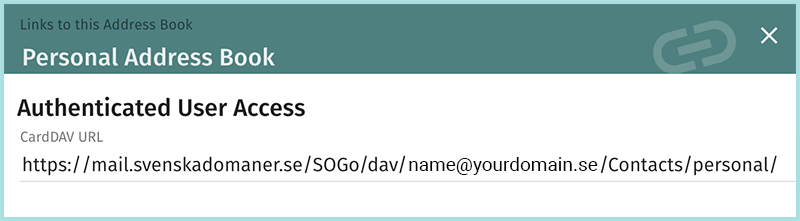
9. Copy CardDAV URL.
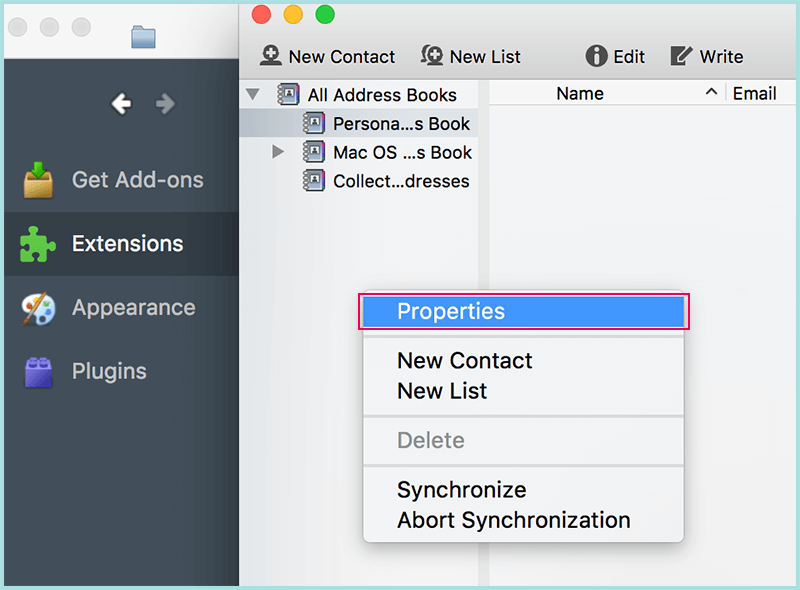
10. Launch Thunderbird and open Address book:
– macOS: menu Windows -> Address Book. Right-click in left sidebar and choose ”Properties”.
– Window: menu File -> New -> Remote Address Book
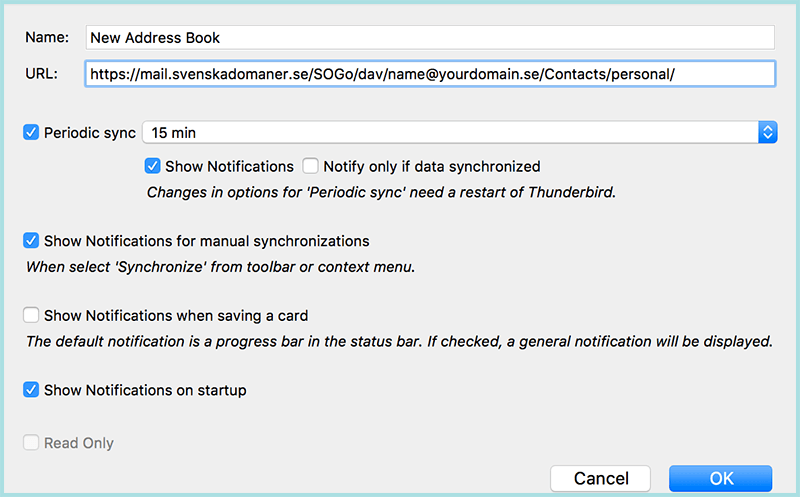
11. Fill in Name of the address book.
URL: paste the link that you copied in step 9.
Optionally check Periodic sync.

12. Click ”ОК” button.

2. For calendar synchronization, you need to set up a CalDav account using Lightning – calendar add-on for Thunderbird. #

How to do it?
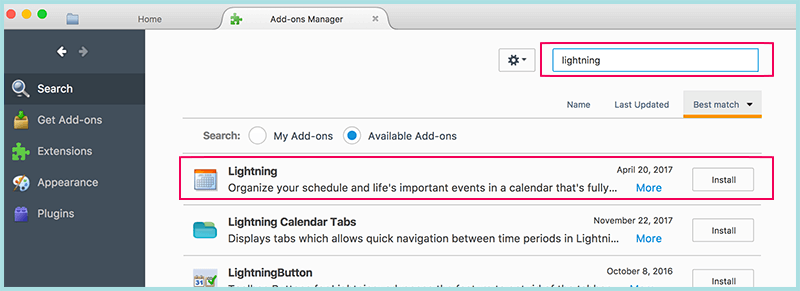
1. Open Thunderbird and go to Tools -> Add-ons. Search ”Lightning” and install it.

2. Restart Thunderbird.

3. Login to your mail account using SOGo: mail.svenskadomaner.se.
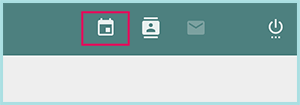
4. Click on ”Calendar” in the top right corner.
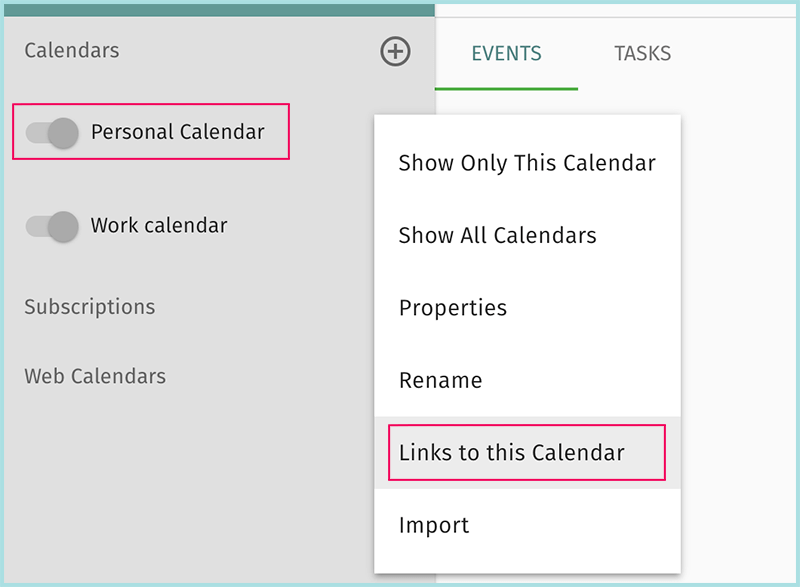
5. Choose the calendar you want to sync (Personal Calendar is the default one), click on 3 vertical dots, choose ”Link to this Calendar”.
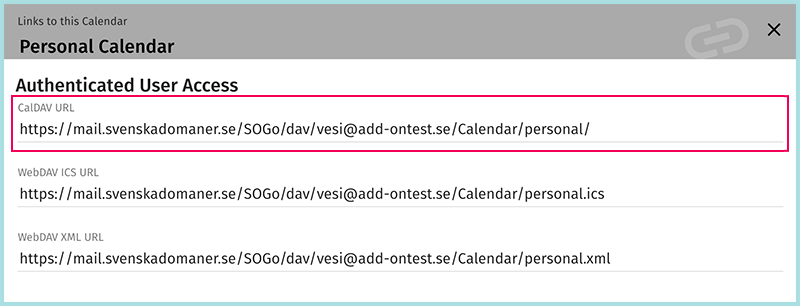
6. Copy CalDAV URL.
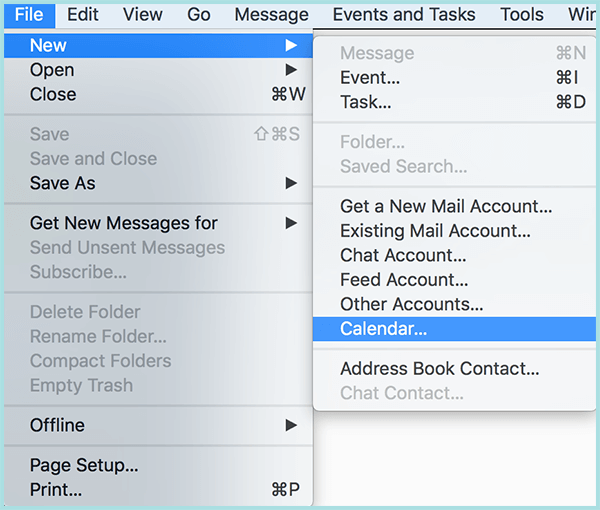
7. Launch Thunderbird and create a new calendar from menu File -> New -> Calendar
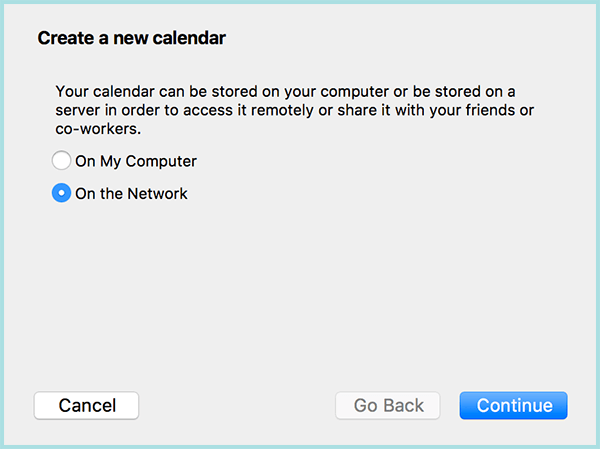
8. Choose ”On the Network” option. Click ”Continue”.
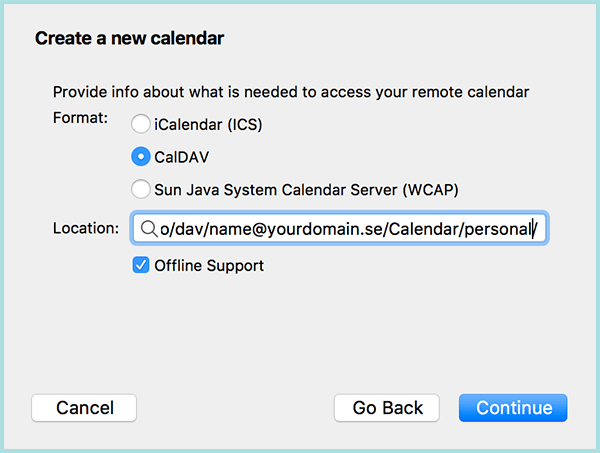
9. Click on the CalDav option and paste the link that you copied in step 6. Click ”Continue”.
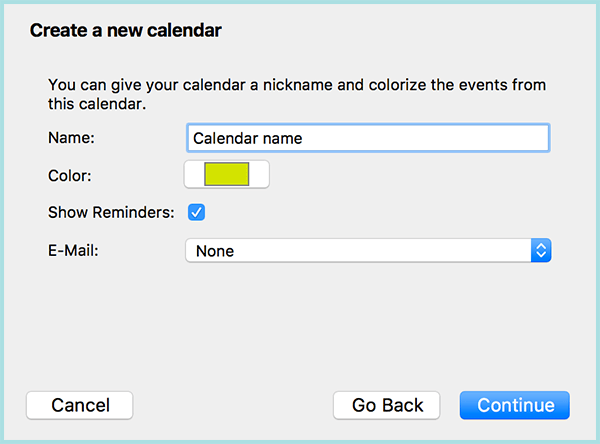
10. Type name for your calendar, optionally choose color, and click ”Continue” button.
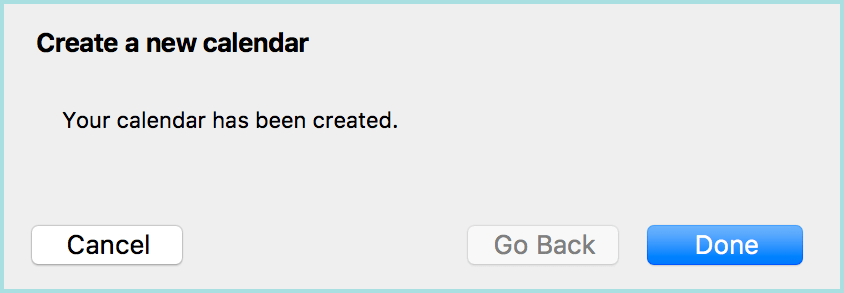
11. Your calendar is added.

What are your Feelings

  • Happy
  • Normal
  • Sad
Share This Article :
  • Facebook
  • X
  • LinkedIn
  • Pinterest
Table of Contents
  • 1. For contact synchronization, you need to set up a CardDav account using SOGo connector.
  • 2. For calendar synchronization, you need to set up a CalDav account using Lightning - calendar add-on for Thunderbird.
Trygga och säkra betalningar
Visa logotyp Stäng-ikon Nets logotyp
Alla priser är SEK ex. moms
Facebook

.se-agent. .nu-agent

Företag

  • Om oss
  • Jobb
  • Kontakta
  • Integritetspolicy
  • Avtalsvillkor
  • Personuppgifts­biträdesavtal

Support

  • Driftinformation
  • Kundcenter
  • Kunskapsbas
  • Skicka supportärende

Tjänster

  • Domänregistrering
  • Domänflytt
  • Toppdomäner
  • Webbhotell
  • E-post
  • SSL-certifikat
  • Microsoft 365
  • Kampanjer
  • 1-klicks-installation


  • 3 sätt – bygga hemsida
  • Hemsida
  • Webbshop
  • Underhåll WordPress-hemsida
  • Weebly hemsidesbyggare
  • SitePro Hemsidebyggare
  • WordPress
© 2026 Svenskadomäner • Byggt med GeneratePress